Closing the Loop on AI Workflows (Feedback powered by MCP)
Despite now having great clients, powerful tools, and incredible models, getting these systems to actually do what we want — consistently — is still way harder than it should be. Each product is impressive on its own, but the real friction starts when we iterate on workflows, especially as our use cases naturally evolve.
Over the year, I’ve built up a small collection of workflows spanning different clients, tools, models, and prompts. Each serves a specific purpose and helps with tasks I do regularly. None of this is groundbreaking, but workflows change over time — and updating them is inconvenient, manual, and honestly a pretty frustrating experience.
One simple example: my Post-Meeting Follow-Up workflow, built from a single prompt in a Claude Project.
Input a meeting transcript → identify commitments/action items → create Todoist tasks via the Disco MCP.
As time went on, I needed refinements, like:
- Not creating tasks when other people have action items
- Tagging tasks for relevant stakeholders
- Drafting Slack messages for certain follow-ups
- Opening Pylon issues for others
The whole point of this workflow is to save time — and manually maintaining prompts every time something needs tweaking is not exactly satisfying.
Workflows tend to run at the most time-sensitive moments, too. And the second I run them, that’s when I have the clearest sense of whether they worked, what I wanted, what was missing… which is also the exact moment I’m the most time-poor.
The tools are powerful — but they don’t have context, and they don’t have memory. They don’t know when they get something wrong. They don’t improve unless I improve them.
As a user, I want to give feedback in the moment, not later. And I want my workflows to work across clients, stay in parity, and evolve together — not become slightly different, diverging versions scattered across tools.
The Solution: Closing the Loop with MCP Tools
This led me to build a feedback loop directly into my workflows, powered by MCP. The big advantage is that MCP supports prompts, works across clients, and can run locally or remotely.
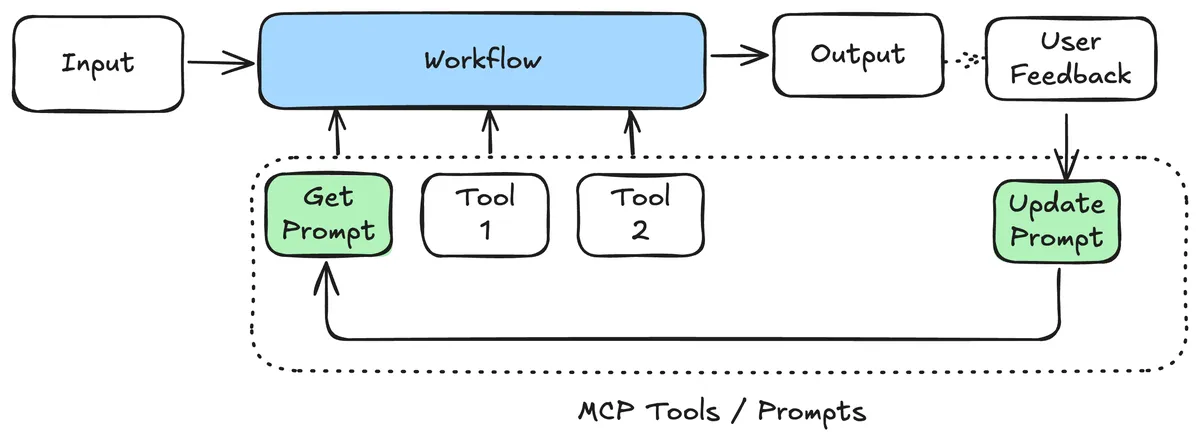
The Architecture
The server exposes three simple tools:
get_current_prompt– fetch the current system promptupdate_prompt– update the system prompt with new instructionssubmit_feedback– store feedback and performance metrics (future feature)
Right now, I mostly use the prompt-updating piece whenever I spot something the workflow didn’t quite nail. It versions every change automatically, so I can see how the prompt evolved over time.
The feedback tool is ready, but I haven’t really needed it yet — updating the prompt has been enough. Long term, the idea is to run a more eval-driven approach, using granular patterns to refine the prompt automatically.
The Evolution Process
Looking at the actual prompt versions tells the whole story:
- Version 1: a basic assistant prompt
- Version 15: nuanced instructions around customer commitments vs. recommendations
The key insight was realising the assistant was creating tasks for things I was recommending to customers — not things I was committing to do. That single clarification made the workflow dramatically more accurate.
And the beauty is in the simplicity: when something feels off, I just tighten the prompt. Version history captures the rest.
Is This the Right Long-Term Approach?
Honestly, no.
Ideally, this type of feedback loop should sit inside clients themselves, with proper guardrails and UX, but you’d lose some portability.
It’s also very prone to prompt injection, which is a non-trivial risk.
But for low-impact workflows that require a lot of iteration, this experiment has delivered great results.
At its core, this is a form of AI memory — not just storing facts, but improving performance over time. It learns, adapts, and evolves.
And the nicest part? It works with any MCP tool you already have. No need to rebuild your Jira, Todoist, or Slack integrations. Just add the feedback layer and the AI becomes smarter about how it uses them.
Summary
This setup solves the “workflow drift” problem — that constant mismatch between what I want my AI workflows to do and what they actually do as my needs evolve. By adding an MCP-powered feedback loop, I can refine prompts on the fly, version them, and keep workflows consistent across clients. It’s not the perfect long-term solution, but for real-world, rapid iteration, it’s a simple and effective way to make AI workflows genuinely improve over time.